

Can AI edit or change my hair in a photo?
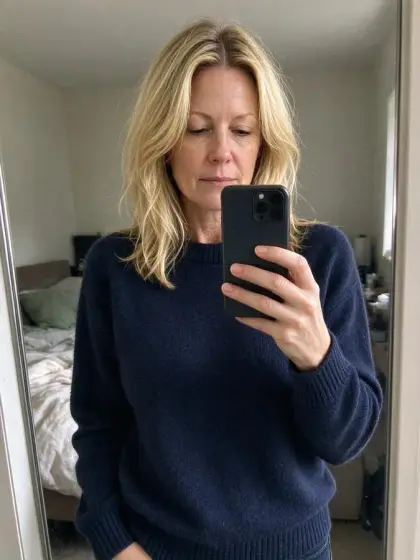
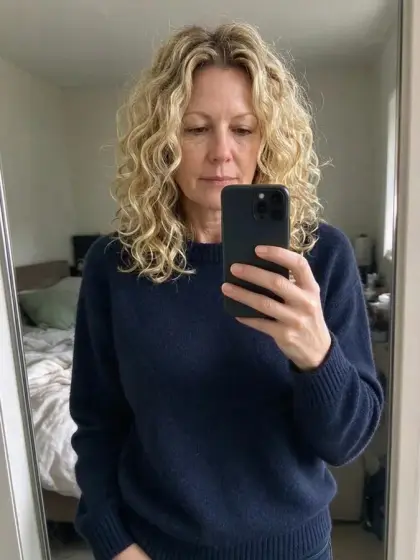
Yes, AI Clothes Swapper has photo tools that change your hairstyle, hair colour, length, bangs, curls and more, each one working in about 40 seconds from a single uploaded photo.
Your face, skin tone, pose and background are kept, and only the hair is redrawn.
Last updated
Which tool for which change
Use the hairstyle changer for general styles, the hair colour changer for 10 colours, and separate pages for long, short, curly, bangs and wolf cut looks.
Going further
There are also tools to go bald, get a buzz cut, or add hair to a thinning head, if the change you have in mind is on that side.
What it will not do
It does not copy a hairstyle from another photo or edit video. Pick from the style options instead.
Photo tips
Show all of your hair, face the camera, and avoid hats. Soft daylight beats a flash.
How to do it
- 1
Choose the tool
Style, colour, length, fringe or curls.
- 2
Upload one photo
JPG, PNG or WebP up to 10 MB.
- 3
Pick an option
The result arrives in about 40 seconds.
- 4
Download
Compare with the slider and save.
Questions people also ask
Will it change my face?
No. It keeps your face and only changes the hair.
Do I need to subscribe?
No. Packs are one-time payments, from $9.99 for 80 images.
Can I edit hair in a video?
No. It works on photos only.