

Can I see myself with curly hair in a photo?
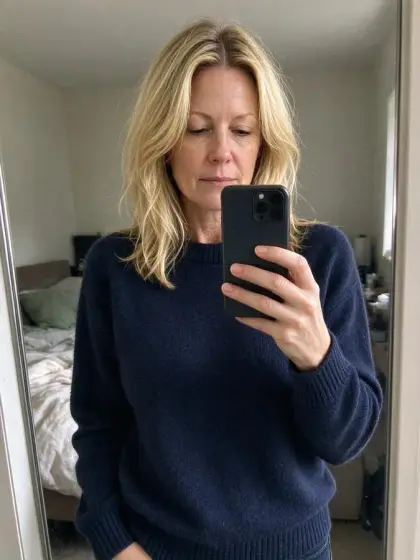
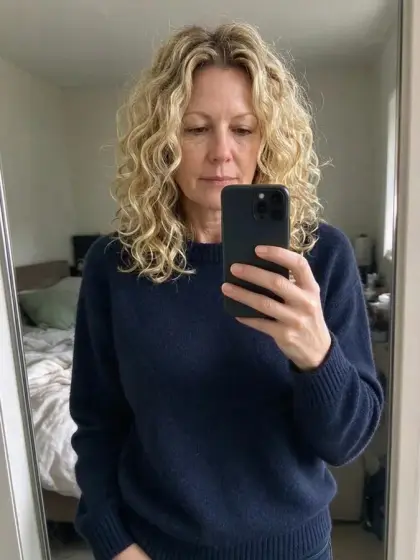
Yes: the curly hair filter shows bouncy curls or a soft perm on your photo in about 40 seconds while keeping your face and background.
It edits an uploaded picture, not a live camera, and each try uses a credit from a one-time pack starting at $9.99.
Last updated
Curls add width
Curly hair is wider than straight hair. Leave space around your head in the photo so the curls are not cut off by the frame.
Straight starting hair gives a clear contrast
From straight hair the change is easy to see. From wavy hair the difference is subtler.
Two styles to compare
Bouncy curls are defined and springy, while a soft perm is looser and more natural.
A picture does not show your curl pattern
Real curl tightness varies by hair type, so this is a guide to the style.
How to do it
- 1
Choose a photo
Head and shoulders, hair visible.
- 2
Pick curls or a soft perm
Select a style.
- 3
Generate
About 20 seconds.
- 4
Compare
Drag the slider and save it.
Questions people also ask
Is there a Snapchat curly filter?
This site is not a live filter. It edits a photo.
Can I change the colour?
Yes, on the hair colour page.
Will it work on short hair?
It can add curls to short styles, with varying results.
What does it cost?
No free plan. Packs start at $9.99 for 80.