

Can I see myself with a different hair color?
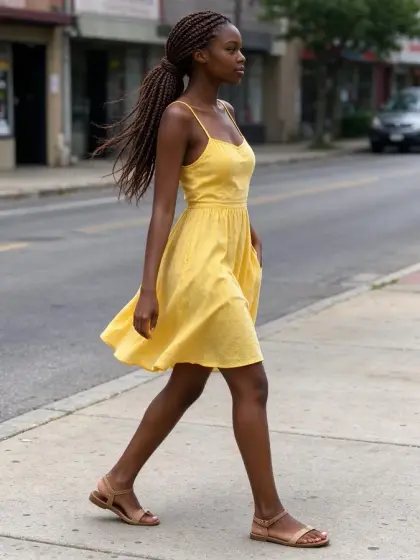
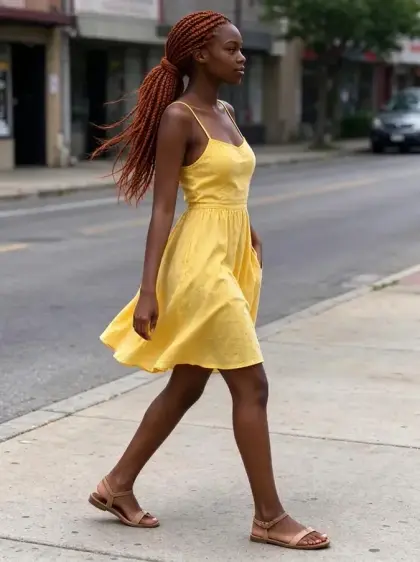
Yes: the hair colour changer offers 10 colours, including platinum blonde, copper red, lavender and jet black, and shows each on your own photo in about 40 seconds.
Your face and hairstyle stay, only the colour changes, and each try uses a credit from a one-time pack starting at $9.99.
Last updated
Dark to light is a big jump
Going from dark hair to platinum or pastel is a large change in real life too. Treat it as a look at the shade, not at the bleaching needed.
Use natural light for the starting photo
Indoor yellow light changes how your current colour reads, and the AI works from what it sees.
Try two shades side by side
Run copper red and a deeper auburn on the same photo to compare against your skin tone.
Roots and highlights
The tool applies an overall colour. Highlight placement or a root shadow is a conversation for your colourist.
How to do it
- 1
Choose a photo
Hair clearly visible, no hat.
- 2
Pick a colour
Select one of the 10 shades.
- 3
Generate
Wait about 40 seconds.
- 4
Compare
Drag the slider, then try another shade.
Questions people also ask
Does it change my hairstyle?
No, only the colour.
Can I pick any hex colour?
It offers 10 set colours, not a free colour picker.
Is it permanent?
It is only a picture. Nothing happens to your real hair.
Is there a free try?
No free plan. You can browse examples at no cost.