

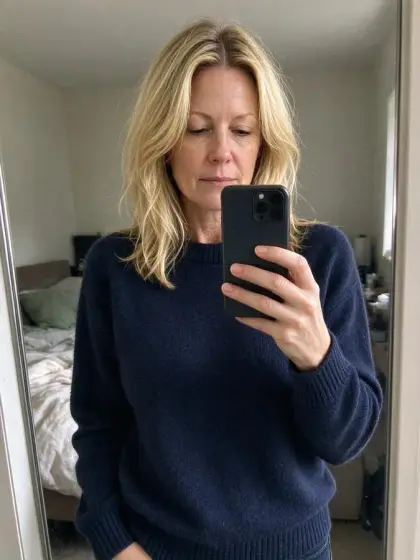
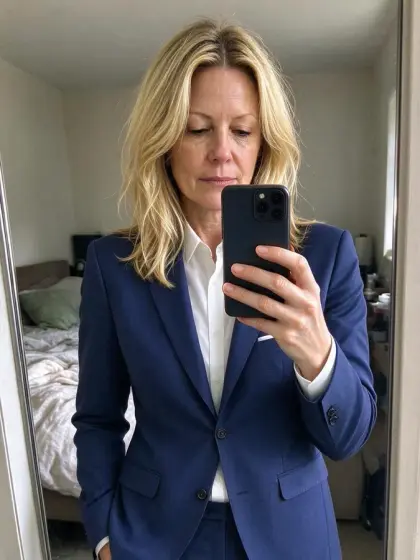
How do I put formal attire on my picture?
Upload a picture of yourself facing the camera, then describe the formal outfit, for example a navy suit with a white shirt, or add a photo of one, and AI Clothes Swapper puts it on you in about 20 seconds.
Your face, hair and background stay the same, so it suits profile pictures and ID-style photos, but check what the form or school requires since some require real, unedited photos.
Last updated
Use a photo with shoulders visible
For a formal portrait, a head-and-shoulders or chest-up photo works well. Keep your arms down and shoulders level so the collar and jacket line sit properly.
Name every piece
Jacket, shirt, tie or neckline, and colours. For example charcoal blazer, light blue shirt and no tie, or black blazer over a white blouse.
Check the rules for official photos
Some applications, passports and school forms do not accept edited photos or have fixed requirements. Ask the requirement-setter before you submit a clothing edit as an official picture.
Headshot tool for work profiles
For a professional profile picture, the AI headshot tool has corporate suit, business casual and white studio looks.
How to do it
- 1
Choose a clear photo
Front-facing, evenly lit, plain background.
- 2
Describe the formal outfit
Or upload a photo of the suit or dress.
- 3
Swap
About 20 seconds.
- 4
Check and download
Slide to compare, then download.
Questions people also ask
How do I edit my picture to formal attire?
Upload it and describe the formal clothes or add a product photo, and only the clothes are redrawn.
Can I do it online without Photoshop?
Yes, it runs in a browser. The first swap is a free clear preview with a small corner label; after that you buy credits.
Can I use it for a 2x2 picture?
A 2x2 format is not something the tool crops to. Edit first, then crop it yourself, and check the photo requirements.
Does it cost anything to try?
There is no free plan, but the first swap is a free clear preview on your own photo, only browsing examples without paying. Packs start at $9.99 for 80.