

How do I change the color of clothes in a photo?
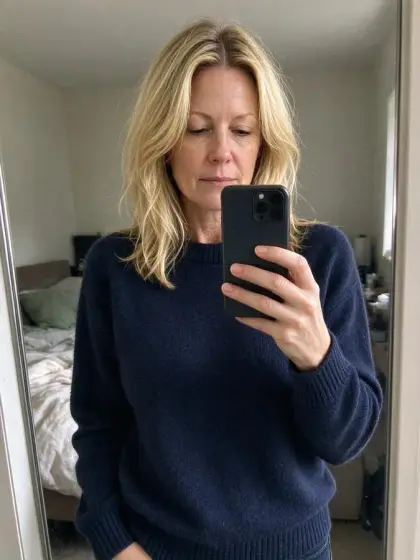
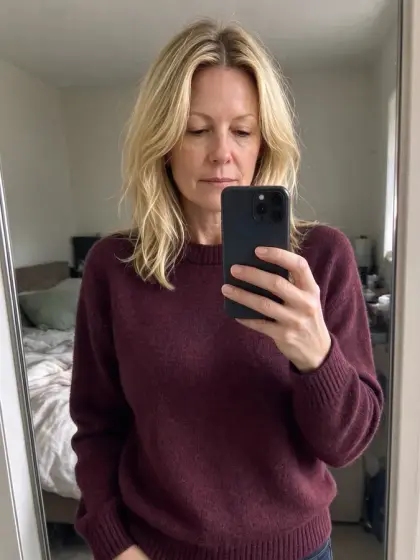
Upload the photo and choose a new colour for the garment, and the clothes colour changer redraws the same item in that colour with its folds and shadows kept.
You do not need Photoshop, masks or layers, and each change uses 1 credit.
Last updated
Same garment, new colour
The shape and texture stay, only the colour changes. Examples include a sweater in burgundy and a polo in forest green.
Skip the Photoshop steps
In Photoshop you would select the clothes, make a hue layer and fix the edges. This tool does that for you.
Light colours on dark ones
Going from black to white is a bigger change than navy to burgundy, so check the result near seams and logos.
One item at a time
Tell it which garment to recolour if the photo has several.
How to do it
- 1
Upload your picture
Clothes clearly visible.
- 2
Pick the garment and colour
Say green, mustard or burgundy.
- 3
Run it
About 20 seconds.
- 4
Compare
Slider shows before and after.
Questions people also ask
Will the pattern stay?
It aims to keep it, but check results.
Is it free?
No free plan, but the first swap is a free clear preview on your own photo.
Can I recolour a dress?
Yes.
Does the face stay?
Yes.