

How do I edit my photo to show bigger muscles?
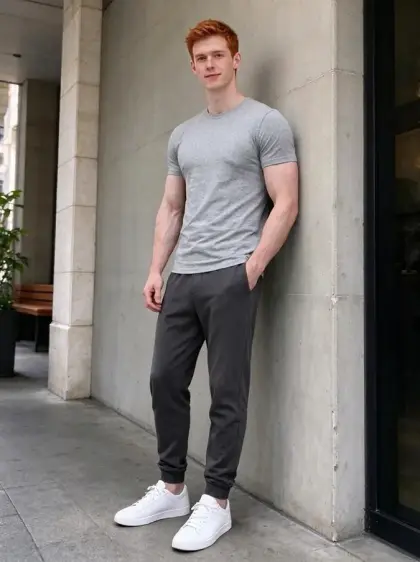
Use the AI muscle generator: upload a photo, choose an athletic or bodybuilder build, and your body is redrawn with more muscle while your face stays.
It takes about 40 seconds per image and uses 1 credit, with packs starting at $9.99 for 80, and it is a visual preview rather than a prediction of what training would do.
Last updated
Choose a clear starting photo
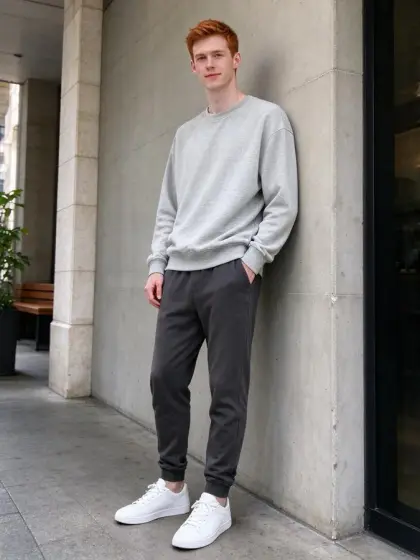
A half-body or full-body photo with the arms and chest visible works best. Loose, baggy clothes hide the body shape, so a fitted top gives the AI more to work with.
Two builds only
You can pick athletic or bodybuilder. Athletic is lean and defined, bodybuilder is much larger, so try athletic first for a believable change.
It is a preview, not a plan
The image shows an imagined body. It does not tell you how long it would take to get there or what training suits you.
Your face and background stay
Facial features, hair, skin tone, pose and background are kept, so the picture still looks like you.
How to do it
- 1
Upload a clear photo
Facing the camera with your upper body visible.
- 2
Choose a build
Athletic or bodybuilder.
- 3
Wait for the result
Photo tools take about 40 seconds.
- 4
Compare and save
Use the slider, then download after buying a pack.
Questions people also ask
Can I edit someone else's photo?
Only with their agreement; you must be 18 or over.
Is it accurate to how I would look?
No. It is a visual preview and not a forecast.
Does it work on women's photos?
The muscle generator works on any adult photo you have the right to use; results are a visual preview.
Is the result high resolution?
Photo tools download at about 900 by 1200 pixels, with no watermark after buying.