

Can I virtually try on a wedding guest dress?
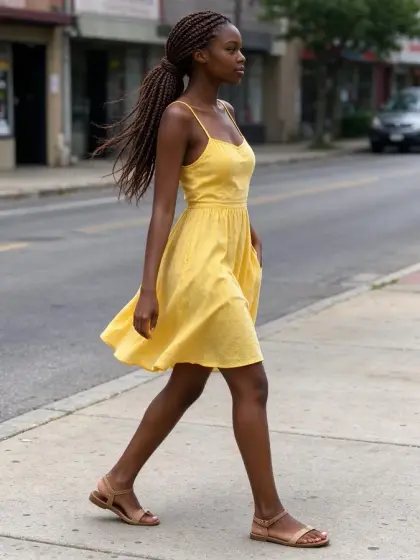
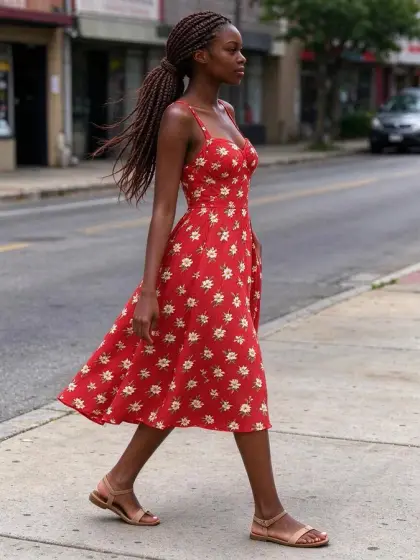
Yes: upload one photo of yourself, add a wedding guest dress photo or a short description, and the AI shows it on you in about 20 seconds with your face and pose kept.
The wedding guest outfit page also covers suits and other formal looks, and each try uses 1 credit from a one-time pack starting at $9.99.
Last updated
Check the dress against the dress code
Hold the invitation next to the result. A dress that looked fine in the shop may be too casual or too formal for "cocktail" or "garden party".
Avoid white and ivory
A guest dress in cream can be mistaken for bridal, and a quick preview on your photo makes that obvious. Try an alternative colour before ordering.
Try the dress with your shoes
Describe the shoes in the same text if your photo shows your feet, so you see the whole look from head to toe.
Compare two or three dresses
Run the listings you are considering on the same photo, and send the results to a friend for a second opinion.
How to do it
- 1
Collect your options
Save two or three guest dress photos.
- 2
Upload yourself
Full-length photo, good light.
- 3
Swap each look
Wait about 20 seconds per dress.
- 4
Choose and order
Slide to compare, then pick one and check its size chart.
Questions people also ask
Does it show the exact fit?
No, only colour, print and style.
Can I try a suit for a wedding too?
Yes, the same page works for suits and tuxedos.
Do I need to install anything?
No. It runs in a web browser.
Is there a free guest dress try-on?
No free plan, but the first swap is a free clear preview on your own photo. Example results can be browsed without signing in, and swaps start from $9.99 for 80.