

How do I add hair to a bald head or cover a bald spot in a photo?
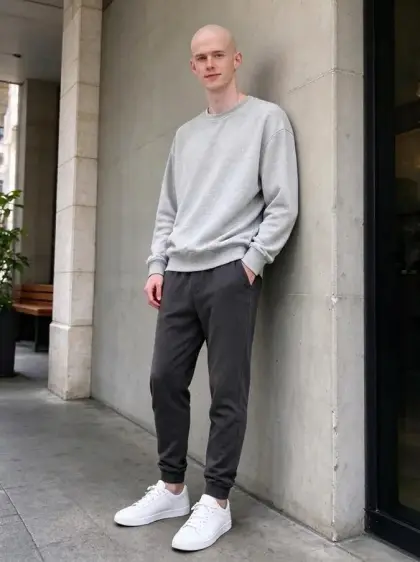
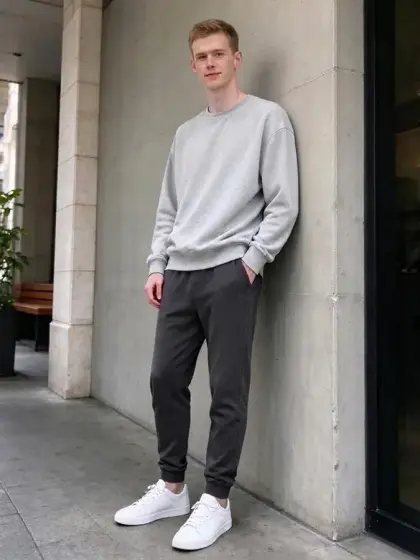
Upload your photo to the add hair tool on AI Clothes Swapper and it draws hair over a bald head or thin spot in about 40 seconds, with no Photoshop cloning or masks.
It redraws the whole hair area rather than patching one small spot, and each result uses 1 credit from a one-time pack starting at $9.99 for 80.
Last updated
Why the manual way is slow
In an editor you would copy hair from elsewhere, match direction, colour and shadow, then blend edges. A small bald spot is manageable, but a large area looks fake quickly.
Whole-head result, not a spot patch
The AI generates a full head of hair, so a tiny crown spot becomes part of a fuller look. If you only want one corner touched, this tool may change more than you need.
Take the photo from the right angle
A top-down shot makes the scalp more visible. Level, front-facing photos give the AI the true hairline and a believable result.
Visual use only
This helps you imagine yourself with hair or tidy a picture. It is not medical advice and does not show what any treatment would produce.
How to do it
- 1
Choose a sharp, level photo
The top of your head should be visible.
- 2
Upload it to the add hair tool
JPG, PNG or WebP up to 10 MB.
- 3
Generate the result
It takes about 40 seconds.
- 4
Compare and download
Check the hairline against your original.
Questions people also ask
Can it fix just one small spot?
It redraws the hair area as a whole, so it is not a spot retouching tool.
Does it work on a bald head?
Yes. The examples include a bald head and a shaved head turned into full hair.
Is this a medical tool?
No. It is a visual preview and not medical advice.
Can I try it without paying?
There is no free plan. You can browse examples for free and pay by pack for your own photo.