

Why does ChatGPT change my face when I edit a photo?
General chatbots usually regenerate the entire image from your request instead of changing one region, so the face is rebuilt from scratch and can drift.
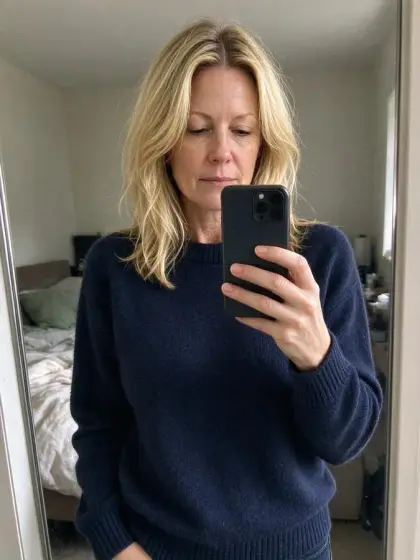
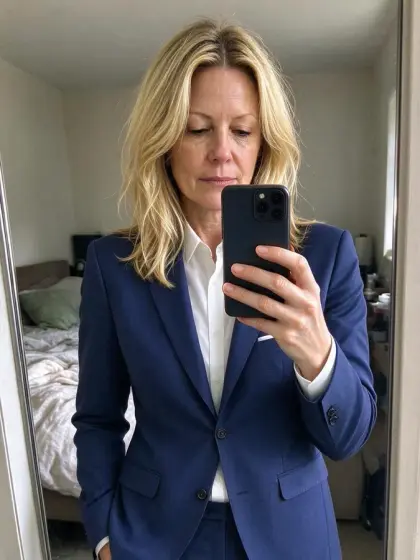
AI Clothes Swapper is built to edit only the clothes while keeping your face, hair, skin tone and pose from the original photo, which is why the person still looks like you.
Last updated
Regenerating versus editing
When a model produces the whole picture again, every pixel is a new guess, including your nose and eyes. Targeted editing leaves the face untouched.
Ask for less in the prompt
With any tool, asking for a single change helps, such as 'only change the shirt'. Long, vague prompts invite more changes.
What stays the same here
Face, facial features, hair, skin tone, body shape, pose and background are kept. Only the clothes are redrawn, with folds, shadows and lighting matched.
Check with the slider
After each swap, drag the before and after slider over the face. If it is unchanged, the edit worked as intended.
How to do it
- 1
Upload one sharp photo
Face visible, good light.
- 2
Give only the outfit
A clothing photo, a description or a preset.
- 3
Swap
About 20 seconds.
- 4
Compare faces
Drag the slider and confirm the face matches.
Questions people also ask
Does the tool ever change my face?
It is designed to keep it. If something looks off, try a sharper, front-facing photo.
Can it edit hair as well?
Yes, separate hair tools change style or colour and keep your face.
Do other tools work differently?
Many redraw the whole image, but we can only speak for how this site works.
Is a failed swap charged?
No, a failed swap refunds the credit automatically.