

How do I add bangs to a photo?
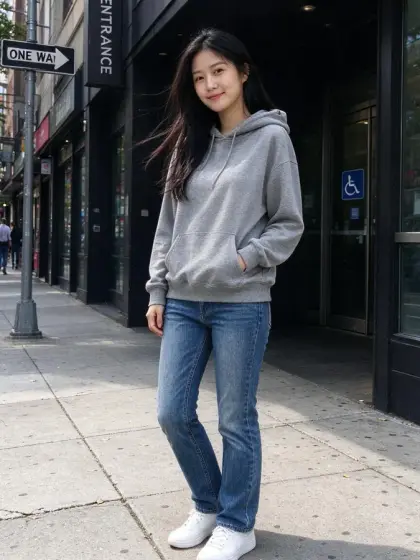
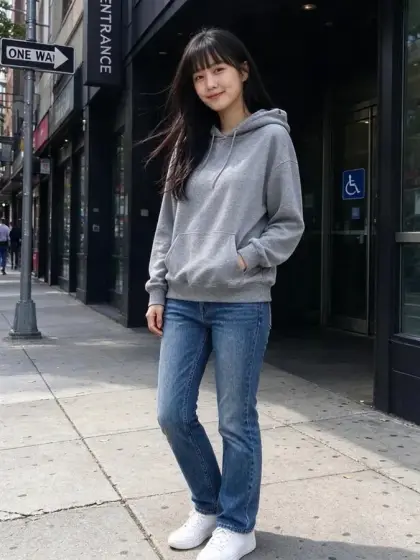
Upload one photo to the bangs filter on AI Clothes Swapper, pick curtain, blunt or wispy bangs, and a version of you with bangs comes back in about 40 seconds.
There is no Photoshop, brush work or masking involved, and each result uses 1 credit from a one-time pack starting at $9.99 for 80.
Last updated
Why the DIY route is hard
Drawing bangs on yourself in an editor means building strands, matching your hair colour, and getting the forehead shadow right. Mistakes show immediately in the shadow under the fringe.
Choose by how much forehead you want covered
Blunt covers the most, wispy lets skin show through, and curtain leaves the centre open. Pick the one that matches how much change you want.
Tie your hair back in the photo
A clear forehead and hairline give the AI a clean surface to place bangs on. Hair already across the face confuses the starting point.
Photos of others
Only add bangs to a photo of someone who agreed. The tool is for adults.
How to do it
- 1
Take a front-facing photo
Forehead visible, even lighting.
- 2
Open the bangs filter
Upload your photo.
- 3
Pick a bang type
Curtain, blunt or wispy.
- 4
Download
Result after about 40 seconds.
Questions people also ask
Do I need editing skills?
No. You upload and choose; the AI does the drawing.
Can I preview different lengths?
The options are curtain, blunt and wispy. Specific lengths are not selectable.
Is it free?
No free plan. No free plan. You can browse examples for free, and your own photo uses a credit.
Does it work on iPhone?
Yes, in Safari or Chrome. For HEIC photos set the camera to Most Compatible or export as JPG.