

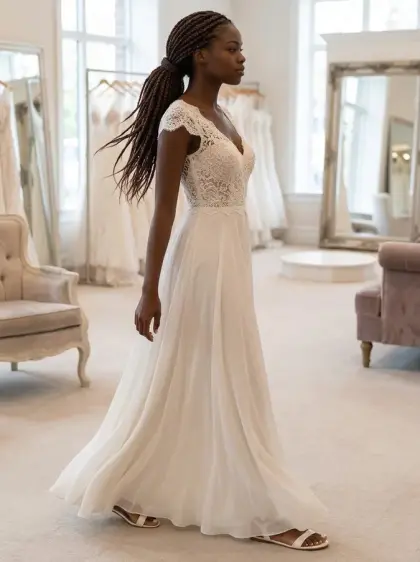
What does an A-line V-neck wedding dress look like on me?
Upload one photo of yourself, describe or upload the A-line V-neck gown you like, and the main clothes swapper shows it on you in about 40 seconds with your face, pose and background kept.
The wedding dress try-on's A-line lace preset is a good starting shape, but the V-neck, length and train come from your description or the product photo; each image costs 1 credit, from $9.99 for 80.
Last updated
The V makes the neck look longer
A V-neckline draws the eye down and can balance a fuller skirt. How deep it goes is personal, so compare a modest V with a deeper one.
Check how deep is too deep
What feels right in a photo may feel different when you move. The preview helps you decide the shape, and a fitting tells you about comfort.
Length and train from words
Describe 'tea length', 'chapel train' or 'boho lace'. Each is a different image, so keep one variable per attempt.
Stand straight, arms slightly away
This lets the AI see your shoulders and waist and place the neckline correctly.
How to do it
- 1
Upload a sharp photo
Half or full-body, facing the camera.
- 2
Describe the dress
For example 'A-line V-neck wedding dress with a chapel train'.
- 3
Swap
About 20 seconds.
- 4
Try variations
Change length, lace or sleeves and compare.

Questions people also ask
How do I make a V-neck wedding dress?
This tool does not sew or design patterns; it only shows a visual preview of a V-neck gown on your photo.
Is there a V-neck preset?
No, V-neck comes from your description or a product photo.
Can I see a short or tea-length version?
Yes, name the length in your text.
Will it show me whether it fits?
No, it is not a size tool.
Related questions
- What does a simple A-line wedding dress without lace look like?
- What does an A-line wedding dress with sleeves or straps look like?
- Is a simple wedding dress too plain, and what does it look like on me?
- How does an A-line lace or tulle wedding dress look on me?
- Does an A-line V-neck dress work for a wedding guest or formal event?