

Can I try on a saree online with AI?
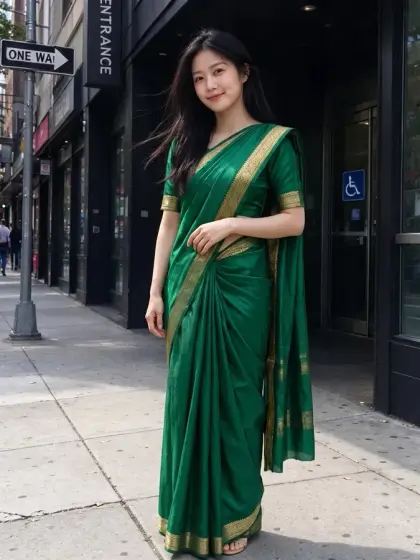
Yes: upload a full-length photo of yourself plus a photo of the saree from any online shop, and the saree try-on shows it on you in about 20 seconds.
It runs in a phone or computer browser with nothing to install, and a one-time pack from $9.99 for 80 covers the tries.
Last updated
Any shop's saree photo works
You are not limited to one store. A product photo from a marketplace or a boutique page can be uploaded as the saree.
Stand so the whole length shows
The saree needs space around your body to drape. Stand straight in a fitted top, with your feet visible.
Try a few shades before ordering
Save two or three listings and run them on one photo. You compare colour and border against your own skin tone.
Describe it if you have no photo
Type something like "green Banarasi saree with a gold border" and the tool draws one.
How to do it
- 1
Prepare your photo
One full-length JPG, PNG or WebP under 10 MB.
- 2
Add the saree
Upload its listing photo or type a description.
- 3
Swap
Wait around 20 seconds for the result.
- 4
Drag to compare
Check the before and after, then download.

Questions people also ask
Does it show exact fit?
No. It shows colour, print and style, not size, so use the shop's size chart for fit.
Can I see the blouse design too?
If the blouse is visible in the saree photo, the AI uses it as a guide.
Is there a free try-on?
There is no free plan, but the first swap is a free clear preview on your own photo. Browsing the example results costs nothing, and packs start at $9.99.
Do I need to sign in?
Every pack can be bought without signing in first; a guest account is made at checkout.
Related questions
- Can I wear a black saree, and what should I wear with it?
- Can I virtually try on a lehenga online?
- Can I wear a saree to an Indian wedding or a Western wedding if I am not Indian?
- How do I style a pink saree, and what colours go with it?
- How do I wear a saree, and can I preview the look on my photo first?